
How Enterprise Software Solutions Unify Growing Operations
Growth is exciting until every department starts running on its own version of the truth. Sales has one customer record, finance has another. Inventory updates lag behind orders. Managers spend more time chasing reports than making decisions. At that point, growth does not just add revenue, it adds operational drag.
That is where enterprise software solutions become strategic. They connect the systems, data, workflows, and people that keep a business moving. Instead of managing finance, sales, purchasing, inventory, HR, and service through disconnected tools, a unified platform gives teams one operating backbone.
For growing companies in the USA, UAE, and other fast moving markets, the goal is not simply to "buy software." The goal is to create a more reliable way to run the business, scale operations, and make decisions with confidence.
What it means to unify growing operations
Unifying operations means more than putting all departments inside one login. A truly unified system standardizes how information moves across the company.
When a sales order is confirmed, inventory should update automatically. When inventory drops below a threshold, purchasing should know what to reorder. When products are delivered, finance should be ready to invoice. When leadership reviews performance, they should see accurate numbers without waiting for manual spreadsheet consolidation.
In a disconnected business, each team optimizes locally. Sales moves fast, operations catches up later, finance reconciles after the fact, and managers discover problems too late. In a unified business, teams work from shared processes and shared data.
If you are still clarifying the broader ERP concept, OdooVizion has a helpful primer on what ERP software is and how it works before you evaluate specific platforms.
Why growing companies outgrow disconnected tools
Small teams can often survive with spreadsheets, accounting software, email approvals, and a few standalone apps. Everyone knows who to ask. Exceptions are manageable. Manual work feels cheaper than a system implementation.
As the company grows, that changes quickly. More customers, products, warehouses, employees, vendors, and regulations create more handoffs. Every handoff becomes a potential delay or error if systems are not connected.
Common symptoms include duplicate data entry, inconsistent reporting, slow approvals, stock inaccuracies, missed follow ups, delayed invoicing, and unclear ownership. None of these issues may look catastrophic alone, but together they create friction that limits growth.
The problem is not usually people. It is the operating model. Teams are forced to compensate for systems that were never designed to scale together.
For a deeper look at the operational risks of fragmented systems, see OdooVizion's guide to the challenges businesses face without ERP.
The core functions enterprise software brings together
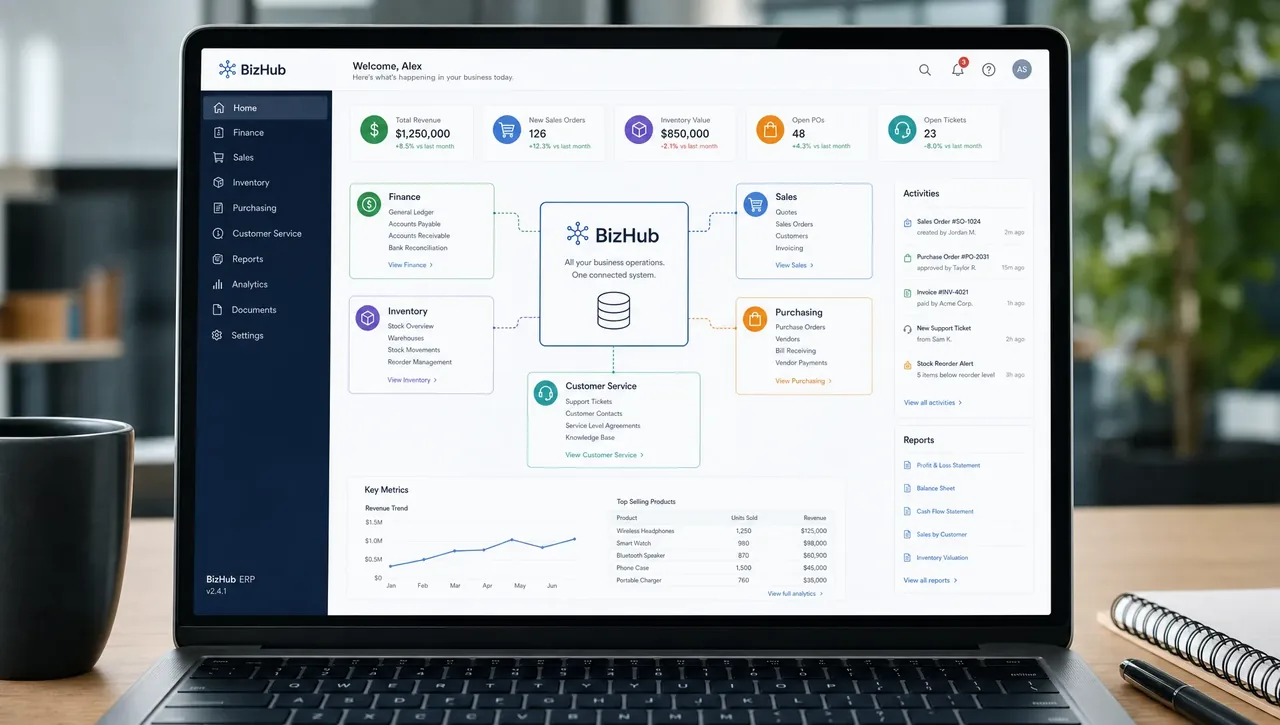
A modern enterprise platform creates a single digital foundation for the main functions that drive the business. The exact modules vary by industry, but the principle is the same: data should flow across departments without constant rework.
| Business function | What unified software improves | Example impact |
|---|---|---|
| Finance and accounting | Invoicing, expenses, cash flow, reporting, controls | Faster month end close and fewer reconciliation issues |
| Sales and CRM | Leads, opportunities, quotations, customer history | Better follow up and more accurate revenue forecasting |
| Inventory and purchasing | Stock levels, replenishment, vendors, landed costs | Fewer stockouts, fewer overstock problems |
| Manufacturing or operations | Work orders, planning, quality, capacity | Better production visibility and schedule control |
| Projects and services | Tasks, timesheets, billing, profitability | Clearer delivery performance and margin tracking |
| HR and administration | Employee records, attendance, approvals | More consistent internal processes |
| Reporting and analytics | KPIs, dashboards, consolidated data | Faster decisions based on current information |
This unified structure matters because operational performance is rarely isolated. A sales decision affects inventory. A procurement delay affects customer delivery. A service issue affects retention and revenue. Enterprise software helps teams see those relationships earlier.
How enterprise software solutions create one operating model
The strongest enterprise systems do not just store data. They shape how work happens across the company.
A single source of truth
When different teams maintain separate records, the business loses trust in its numbers. A unified system reduces duplicate records and makes core data available to the people who need it.
For example, customer details, product information, pricing, taxes, stock quantities, and payment status can be managed in one shared environment. This improves accuracy and reduces the time spent checking which file, app, or email thread is correct.
Automated workflows
Manual handoffs slow down growing companies. Enterprise software can automate repeatable steps such as approval routing, purchase order creation, invoice generation, inventory updates, and customer notifications.
Automation is not about removing human judgment. It is about removing avoidable administrative work so people can focus on exceptions, customer service, analysis, and growth.
Standardized processes
As companies expand across locations, teams, or markets, informal processes become harder to control. Unified software makes it easier to define standard workflows for purchasing, sales, returns, approvals, production, and reporting.
Standardization improves consistency, but it also makes training easier. New employees can learn a documented process inside the system instead of relying on tribal knowledge.
Better visibility for leaders
Leadership needs current operational insight, not last week's exported spreadsheet. A unified platform can help managers monitor key indicators such as order status, sales pipeline, inventory value, cash flow, project profitability, and delivery performance.
This visibility is especially important for SMBs entering a new growth stage. Decisions about hiring, expansion, pricing, procurement, and customer commitments become much stronger when they are based on reliable data.
Where Odoo fits into unified operations
Odoo is often considered by growing businesses because it is modular. Companies can begin with the applications they need most, then expand into additional functions as operations mature. This makes it attractive for organizations that want a unified ERP foundation without taking on unnecessary complexity at the start.
Odoo can support core areas such as CRM, sales, accounting, inventory, purchasing, manufacturing, projects, eCommerce, HR, and more, depending on the edition, configuration, and business requirements. The key is not simply enabling modules. The real value comes from designing the right workflows, migrating data carefully, and training teams to use the system consistently.
If you are comparing platforms, OdooVizion's top ERP software comparison guide can help you evaluate how leading options differ in flexibility, cost, scalability, and fit for SMB operations.
Signs your operations need a unified system
Not every business needs a full ERP implementation on day one. But certain signals show that disconnected tools are becoming a growth barrier.
You may be ready for enterprise software if:
- Your team enters the same data in multiple systems.
- Managers rely on manual spreadsheet reports to understand performance.
- Inventory numbers are often different from what is physically available.
- Sales, finance, and operations disagree on order or customer status.
- Approvals depend on email chains or informal messages.
- Growth has created more exceptions than your team can manage manually.
- You are expanding across locations, warehouses, legal entities, or markets.
The strongest signal is usually not one big failure. It is a pattern of small delays, unclear ownership, and repeated manual corrections. Those are signs the business has outgrown its operating structure.
What to look for in enterprise software solutions
Choosing a platform is not only an IT decision. It affects how the business operates every day. The right solution should support current needs while leaving room for future growth.
Modularity and scalability
Growing companies need software that can expand without forcing a complete restart. A modular system lets the business implement priority functions first, then add more capabilities when the timing is right.
This is important for SMBs because a phased approach can reduce implementation risk. Instead of trying to transform every department at once, the company can focus on the areas with the highest operational impact.
Integration capability
Even with a strong ERP, some businesses still need specialized systems for payments, shipping, industry tools, websites, marketplaces, or reporting. Enterprise software should support clean integrations so data can move reliably between platforms.
Poor integrations can recreate the same data silos the company is trying to eliminate. During evaluation, it is important to identify which systems must connect, what data should move, how often it should sync, and who owns each process.
Customization without unnecessary complexity
No two businesses operate exactly the same way. Custom workflows, reports, modules, and automations can be valuable when they reflect genuine business requirements.
However, customization should be handled carefully. Over customizing too early can make future upgrades harder and increase support needs. A good implementation partner helps decide when to configure standard functionality, when to customize, and when to redesign the process instead.
Data migration quality
Data migration is one of the most important parts of any enterprise software project. Customer records, vendor details, product catalogs, inventory balances, financial data, open orders, and historical transactions must be reviewed, cleaned, mapped, and validated.
A smooth migration requires more than importing files. It requires business rules, ownership, testing, and sign off. This is especially important for companies moving from legacy systems or spreadsheet heavy processes.
Training and support
A unified system only works if teams adopt it. Training should be role based, practical, and connected to real daily workflows. Employees need to understand not only which buttons to click, but why accurate system usage matters across departments.
Ongoing support is also critical after go live. New questions, edge cases, process improvements, and optimization needs will appear once teams begin using the system in real operations.
A practical roadmap for unifying operations
A successful enterprise software project starts with business clarity, not software configuration. Before implementation begins, the company should understand its current pain points, process gaps, data issues, and growth goals.
A practical roadmap often includes discovery, process mapping, solution design, data cleanup, configuration, customization if needed, integrations, testing, training, go live support, and post launch optimization.
The most effective implementations are collaborative. Finance, sales, operations, warehouse, HR, management, and IT stakeholders should all be involved at the right stages. This prevents the system from being designed around only one department's view of the business.
For businesses implementing or migrating to Odoo, working with an Odoo certified partner can reduce risk. OdooVizion provides ERP implementation, migration, customization, integration, training, consultation, and ongoing support for companies that need a structured path to a unified system.
Measuring the success of unified operations
Enterprise software should be evaluated by operational outcomes, not just whether the system goes live. Before implementation, define the metrics that matter most to your business.
| Goal | Metric to monitor | Why it matters |
|---|---|---|
| Faster financial control | Month end close time, invoice cycle time | Shows whether finance has cleaner data and fewer manual steps |
| Better inventory accuracy | Stock variance, stockout frequency, inventory turnover | Measures whether purchasing and fulfillment are more reliable |
| Improved sales execution | Quote to order conversion, pipeline accuracy, response time | Indicates whether teams can manage revenue opportunities better |
| Stronger operations | Order cycle time, on time delivery, production delays | Shows whether internal workflows are more coordinated |
| Better service quality | Ticket response time, repeat issues, customer satisfaction | Connects operational visibility to customer experience |
| Higher adoption | Active users, process compliance, training completion | Confirms whether teams are actually using the system correctly |
These metrics help leadership move beyond subjective opinions. If the system is working, teams should spend less time reconciling data, fewer decisions should depend on guesswork, and operational bottlenecks should become easier to identify.
Common mistakes to avoid
The biggest mistake is treating enterprise software as a technical installation instead of a business transformation. Software cannot fix unclear processes unless the company is willing to define how work should happen.
Another common mistake is migrating bad data into a new system. If product records, customer files, vendor lists, and accounting structures are inaccurate before migration, the new platform may simply expose the problem faster.
Companies also underestimate change management. Employees may resist a unified system if they do not understand how it helps their work or if they feel the system is being imposed without input. Clear communication, hands on training, and management alignment are essential.
Finally, avoid implementing everything at once unless there is a strong business reason and the organization is ready. A phased rollout can help teams build confidence while reducing disruption.
Frequently Asked Questions
What are enterprise software solutions?
Enterprise software solutions are business systems that help organizations manage major functions such as finance, sales, inventory, purchasing, HR, operations, and reporting. ERP platforms are one of the most common examples because they connect multiple departments through shared data and workflows.
How do enterprise software solutions unify operations?
They unify operations by centralizing data, automating workflows, standardizing processes, connecting departments, and giving leaders real-time visibility into business performance. This reduces manual work and helps teams make decisions from the same information.
When should a growing business move from spreadsheets to ERP?
A business should consider ERP when spreadsheets create delays, errors, duplicate data entry, reporting confusion, or poor visibility across departments. The need becomes stronger when the company adds more products, locations, employees, customers, or compliance requirements.
Is Odoo a good option for growing SMBs?
Odoo can be a strong option for many SMBs because it is modular and can support multiple business functions in one ecosystem. The right fit depends on your processes, industry needs, integration requirements, budget, and implementation plan.
Why work with an Odoo certified partner?
An Odoo certified partner can help with discovery, configuration, migration, customization, integrations, training, and support. This is important because ERP success depends on both the software and the quality of implementation.
Build a unified operating backbone for growth
Growing operations need more than more apps. They need connected processes, reliable data, and a system that helps teams work together instead of around each other.
OdooVizion helps businesses in the USA and UAE implement, migrate, customize, and support Odoo with a focus on safe transitions, workflow alignment, and long term scalability. If your teams are struggling with disconnected tools or preparing for the next stage of growth, visit OdooVizion to discuss the right ERP path for your business.
Odoo Certified Partner Honest fit, scope, and cost read Reply within 1 business day
Running growth on disconnected tools?
Tell us your stack and where teams lose time — we’ll map what a unified Odoo setup would connect first. No obligation.