
Business Process Management Software That Eliminates Bottlenecks
Bottlenecks rarely announce themselves with a single dramatic failure. They show up as orders waiting for approval, inventory numbers that do not match, invoices stuck in someone's inbox, or managers asking the same question every morning: "Where are we blocked?"
For small and mid-sized businesses, these delays become more expensive as the company grows. More customers, more transactions, more locations, and more employees create more handoffs. If those handoffs are managed through spreadsheets, email threads, disconnected apps, or tribal knowledge, the business eventually slows down.
That is where business process management software becomes a serious operational advantage. The goal is not just to digitize tasks. The goal is to make each process visible, measurable, automated where possible, and connected to the systems that run the company.
Why Bottlenecks Keep Coming Back
A bottleneck is any point in a process where work accumulates faster than it can move forward. In practice, bottlenecks are usually caused by one of five issues: unclear ownership, manual approvals, duplicate data entry, disconnected systems, or a lack of real-time visibility.
The problem is that many companies try to solve bottlenecks by asking people to "communicate better" or "work faster." That may help temporarily, but it does not fix the process design. If a sales order still has to be copied manually into inventory, finance, and delivery systems, the delay will return. If managers still need to chase status updates across departments, decisions will remain slow.
This is one reason companies operating without a connected ERP often struggle with hidden inefficiencies, data silos, and limited visibility. OdooVizion has covered these operational risks in more depth in its guide to the challenges of ERP absence in business operations, but the central lesson is simple: processes cannot flow smoothly when the information behind them is fragmented.
What Business Process Management Software Actually Does
Business process management software helps companies design, execute, monitor, and improve workflows. A workflow might be as simple as approving a purchase request or as complex as managing a full order-to-cash cycle across sales, inventory, finance, and customer service.
Good BPM software usually supports four core activities:
- Modeling: Mapping how work should move from one step to the next.
- Automation: Triggering actions, approvals, reminders, notifications, and updates without manual follow-up.
- Monitoring: Tracking process performance, delays, exceptions, and workload.
- Optimization: Using process data to identify where work slows down and how to improve it.
Formal process mapping often uses BPMN, a widely adopted standard maintained by the Object Management Group. You do not need to become a BPMN expert to remove bottlenecks, but the principle matters: a process should be clear enough that teams can see how work moves, who owns each step, and what happens when something goes wrong.
BPM Software vs ERP: Why the Difference Matters
BPM software focuses on improving workflows. ERP software focuses on managing business operations such as finance, inventory, sales, purchasing, manufacturing, HR, and service. The strongest results often happen when BPM capabilities are connected to an ERP system, because process improvement and operational data need to work together.
For example, a standalone workflow tool can route a purchase approval. But if it is not connected to vendors, budgets, inventory, accounting, and receiving, the process still depends on manual updates. The approval may be digital, but the operation is not truly integrated.
An ERP-connected approach helps close that gap. If you are still evaluating what ERP means in practical business terms, OdooVizion's overview of what ERP software is and how it works is a useful foundation. For bottleneck elimination, the key idea is that ERP gives workflows a single operational backbone instead of forcing each department to maintain its own version of the truth.
Bottleneck-Eliminating Features to Look For
Not every workflow tool is built to handle real operational complexity. When evaluating business process management software, look beyond basic task tracking. The right system should help you reduce waiting time, prevent rework, and give managers reliable visibility into performance.
| Capability | How it removes bottlenecks | What to verify before choosing software |
|---|---|---|
| Process mapping | Shows every step, owner, dependency, and decision point | Can teams easily understand and maintain the workflow? |
| Automated approvals | Reduces waiting time and manual follow-up | Can rules be configured by amount, role, department, or condition? |
| Integrated data | Prevents duplicate entry and conflicting records | Does the system connect sales, finance, inventory, purchasing, and service data? |
| Exception handling | Routes unusual cases to the right person quickly | Can exceptions be flagged, escalated, and tracked? |
| Real-time status visibility | Helps managers see where work is stuck | Are dashboards and reports easy for operational teams to use? |
| Audit trails | Improves accountability and compliance | Can users see who approved, changed, or completed each step? |
| Custom workflows | Supports business-specific processes | Can workflows be adapted without creating unnecessary complexity? |
A useful rule of thumb is this: if a feature only helps people remember tasks, it may improve organization. If it automatically moves accurate data through the business and alerts the right people at the right time, it can remove bottlenecks.
Common Bottlenecks and How BPM Software Solves Them
Every industry has its own operational details, but many bottlenecks follow predictable patterns. The table below shows how business process management software can reduce common delays.
| Bottleneck | Typical cause | Software-enabled fix |
|---|---|---|
| Slow purchase approvals | Requests sit in email or depend on one manager | Automated approval routing based on value, department, or budget |
| Delayed invoicing | Finance waits for delivery confirmation or manual data entry | Integrated order, delivery, and invoice workflows |
| Inventory mismatches | Sales, warehouse, and purchasing use separate records | Shared inventory data with automated updates across departments |
| Customer service delays | Teams lack visibility into orders, returns, or service history | Centralized customer records and task escalation |
| Month-end close delays | Data is scattered across spreadsheets and systems | Standardized finance workflows and controlled data flows |
| Onboarding slowdowns | HR, IT, and managers coordinate manually | Automated task sequences for documents, access, equipment, and approvals |
These fixes are not just about speed. They also reduce error rates and improve employee focus. When software handles repetitive handoffs, employees spend more time on judgment, customer experience, and problem solving.
Where Bottlenecks Hide in Growing Companies
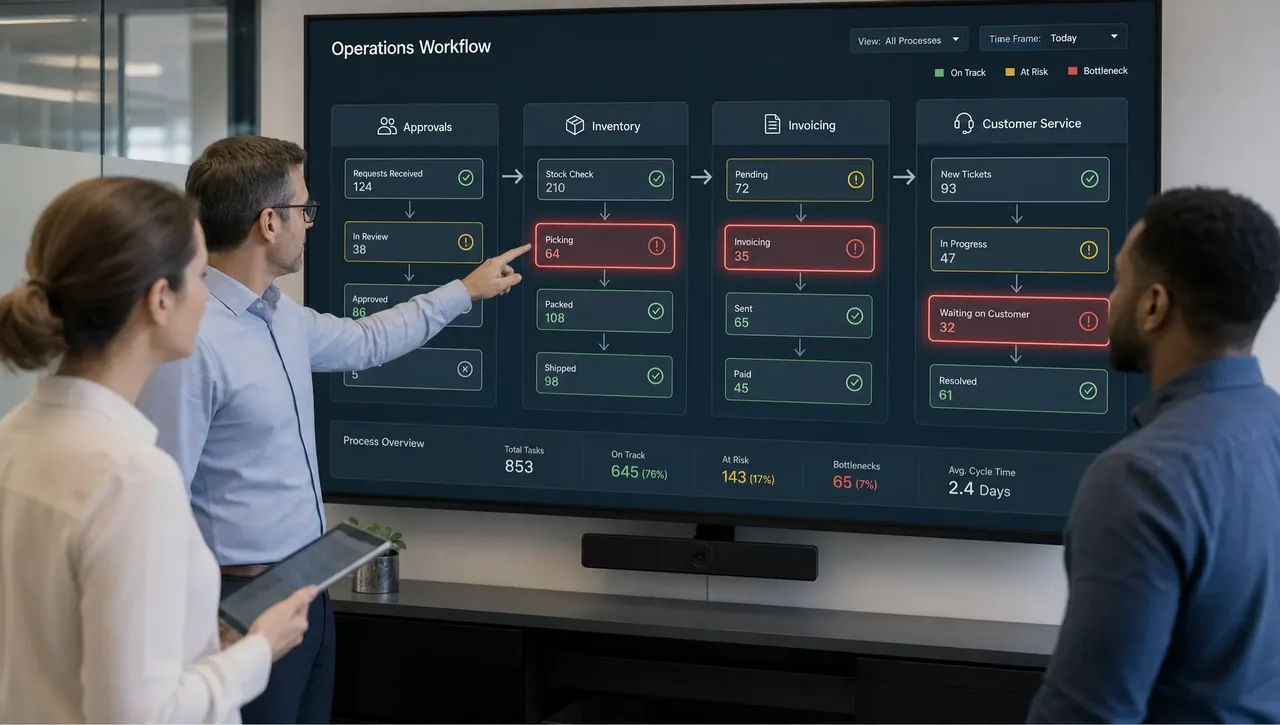
Many leaders think they know where the bottleneck is, but the visible delay is often only a symptom. For example, finance may appear slow to invoice, but the real issue could be late delivery confirmation from operations. A warehouse may seem behind, but the actual problem may be inaccurate sales forecasts or purchasing delays.
Business process management software helps uncover the difference between the symptom and the cause. It shows where work enters a process, how long it waits, who touches it, and what conditions create exceptions.
Some of the most common hidden bottlenecks include:
- Approval dependency: One person becomes the gatekeeper for too many decisions.
- Data re-entry: Teams manually copy information from one system to another.
- Unclear exception paths: Employees do not know what to do when a case does not fit the standard process.
- Spreadsheet ownership: Critical operational knowledge lives in files controlled by one department or employee.
- Late visibility: Managers only discover issues after customers, vendors, or auditors notice them.
This is why automation tends to outperform manual work over time. Manual processes may feel flexible at first, but they become fragile when volume increases. OdooVizion's comparison of manual work vs ERP cost explains how hidden labor, errors, delays, and compliance risk can quietly become more expensive than modernization.
A Practical Framework for Eliminating Bottlenecks
Choosing software is only part of the solution. To get meaningful results, companies need a disciplined approach to process improvement. The following framework works well for SMBs that want practical outcomes without overcomplicating the project.
1. Map the real process, not the ideal one
Start by documenting how work actually happens today. Include emails, spreadsheets, side conversations, manual approvals, and workarounds. If employees have created informal steps to make the process function, those steps matter.
The goal is not to blame departments. The goal is to understand reality. A process map that ignores informal work will produce software that looks clean on paper but fails in daily operations.
2. Measure the bottleneck before automating it
Before changing the workflow, collect baseline numbers. Useful metrics include cycle time, queue time, rework rate, approval time, error frequency, and number of manual touchpoints.
This creates two benefits. First, it helps you prioritize the highest-impact bottlenecks. Second, it gives you a way to prove whether the new process is working.
| Metric | What it reveals | Example use case |
|---|---|---|
| Cycle time | Total time from process start to finish | Quote-to-cash, purchase-to-pay, hiring |
| Queue time | How long work waits before action | Approval queues, warehouse picking, finance review |
| Rework rate | How often tasks must be corrected | Orders, invoices, returns, data entry |
| Manual touchpoints | How many times people manually move or update data | Spreadsheet-heavy workflows |
| Exception rate | How often work leaves the standard path | Custom orders, supplier issues, credit holds |
3. Automate repetitive handoffs first
The best automation candidates are high-volume, repeatable, rules-based tasks. Examples include routing approvals, sending reminders, updating statuses, assigning tasks, generating documents, and notifying teams when conditions change.
McKinsey has long noted that many roles contain automatable activities rather than being fully automatable jobs. Its research on the future of automation and work supports a practical approach: automate the repetitive parts of work so people can focus on higher-value decisions.
For SMBs, this distinction is important. The objective is not to remove people from the process. It is to remove unnecessary waiting, copying, chasing, and checking.
4. Connect the workflow to the system of record
If a workflow relies on outdated or incomplete data, automation can simply move bad information faster. That is why BPM and ERP should be connected.
A sales approval workflow should know customer status, payment terms, product availability, margin rules, and delivery constraints. A purchasing workflow should know vendor details, budgets, inventory thresholds, and accounting requirements. A service workflow should know warranty status, order history, and customer priority.
When process logic is connected to accurate business data, decisions become faster and more reliable.
5. Build clear exception paths
Many process improvement projects fail because they design only the happy path. Real businesses have exceptions: urgent orders, partial deliveries, credit holds, supplier delays, custom pricing, missing documents, and customer escalations.
Business process management software should make exceptions visible and route them to the right owner. If exceptions disappear into email, the bottleneck has not been eliminated. It has only changed location.
6. Train users around outcomes, not screens
Training should not only explain where to click. It should explain why the process is changing, what each role owns, and how success will be measured. Employees are more likely to adopt a new system when they understand how it reduces daily frustration.
This is especially important for companies moving from spreadsheets or disconnected tools to ERP-supported workflows. Change management is not optional. It is part of making the bottleneck stay removed.
Why Odoo Is a Strong Fit for Process Management
Odoo is not just a single-purpose workflow tool. It is a modular ERP platform that can support many business functions in one connected environment, including sales, inventory, accounting, purchasing, manufacturing, CRM, HR, and more depending on the apps a company implements.
For bottleneck removal, that matters because operational workflows usually cross department boundaries. A customer order may affect sales, inventory, shipping, invoicing, and support. A purchasing decision may affect budgets, vendor management, receiving, and accounting. If each function runs in a separate tool, bottlenecks are more likely to reappear at the handoff points.
With the right implementation, Odoo can help companies standardize workflows, automate routine steps, connect data, and scale operations without depending on fragmented spreadsheets. OdooVizion supports this through ERP implementation, migration, customization, integration, workflow automation, training, consultation, and ongoing technical support for businesses in the USA and UAE.
The most important phrase here is "with the right implementation." Software alone does not eliminate bottlenecks. The system has to reflect real business processes, clean data, correct user roles, integration requirements, and practical reporting needs.
When Customization Helps, and When It Hurts
Custom workflows can be powerful, especially when a business has unique approval rules, industry-specific requirements, or specialized operational steps. But customization should be controlled. Over-customizing too early can create a system that is difficult to maintain, upgrade, or train users on — one of the common ERP mistakes that quietly raises cost.
A better approach is to start with standard processes where they make sense, then customize only where the business case is clear. Ask these questions before approving customization:
- Does this customization remove a measurable bottleneck?
- Does it support a process that gives the business a real advantage?
- Can the requirement be handled through configuration instead of custom development?
- Will users understand and follow the customized workflow?
- How will this affect future upgrades, integrations, and support?
For many SMBs, the best implementation strategy is not maximum customization. It is controlled flexibility: standardize the routine, automate the repetitive, and customize the truly important.
Signs Your Business Is Ready for BPM Software
Business process management software becomes especially valuable when growth starts exposing operational friction. If several of the following signs sound familiar, it may be time to modernize your workflows:
- Managers spend too much time asking for status updates.
- Approvals depend on email reminders or personal follow-up.
- Employees enter the same data in multiple systems.
- Customers wait because teams cannot find accurate information quickly.
- Inventory, finance, sales, or service reports do not match.
- Errors increase whenever transaction volume rises.
- Processes break when one key employee is unavailable.
- Leadership cannot see bottlenecks until they become urgent.
These symptoms are often treated as staffing problems, but they are usually process problems. Adding more people to a broken workflow can increase cost without removing the constraint.
How to Choose the Right Business Process Management Software
The right BPM solution depends on company size, industry, compliance needs, existing systems, and growth plans. For SMBs, the most important selection criteria are usually usability, integration, scalability, workflow flexibility, and implementation support.
A strong evaluation should include process owners from each affected department. Finance, operations, sales, warehouse, HR, and customer service may all experience the same workflow differently. If only one team defines the requirements, the software may solve one bottleneck while creating another.
During vendor evaluation, focus on practical demonstrations. Ask vendors or implementation partners to show how the system handles a real process from your business, including exceptions. Do not rely only on generic demos.
You should also consider migration and adoption. If historical data is inaccurate or incomplete, the new workflow may inherit old problems. If employees are not trained, they may return to spreadsheets and side channels. This is why implementation planning, data migration, testing, and user training are as important as software features.
The Role of an Implementation Partner
An experienced implementation partner helps translate business goals into a working system. This includes identifying bottlenecks, redesigning workflows, configuring the ERP, integrating third-party systems, migrating data safely, testing processes, training users, and supporting go-live.
For Odoo projects, this partner role can be especially valuable because Odoo is flexible. Flexibility is a strength, but it requires clear decisions. A certified partner can help determine which workflows should use standard capabilities, which should be configured, and which justify custom module development.
OdooVizion is an Odoo-certified partner serving businesses in the USA and UAE, with services that include Odoo implementation, migration and upgrades, customization, integration, workflow automation, training, consultation, 24/7 technical support, zero-data-loss migration, industry-specific ERP solutions, and on-site go-live support.
That combination matters because bottleneck elimination is not a one-time setup. As your company grows, workflows change. New products, locations, regulations, vendors, and customer expectations will create new process demands. Ongoing support helps keep the system aligned with the business instead of letting workarounds creep back in.
Frequently Asked Questions
What is business process management software?
Business process management software helps companies design, automate, monitor, and improve workflows. It makes processes more visible and reduces delays caused by manual handoffs, unclear ownership, and disconnected systems.
How does BPM software eliminate bottlenecks?
It eliminates bottlenecks by routing tasks automatically, enforcing approval rules, connecting data between departments, flagging exceptions, and giving managers real-time visibility into where work is stuck.
Is ERP the same as BPM software?
No. ERP manages core business operations, while BPM focuses on workflow improvement. However, ERP-connected BPM is often more effective because workflows rely on accurate operational data from finance, inventory, sales, purchasing, and service.
Can Odoo be used for business process management?
Yes, Odoo can support process management through connected ERP workflows, automation, integrations, and customization. The best results depend on proper implementation, clean data, user training, and workflow design.
When should a business replace spreadsheets with BPM or ERP software?
A business should consider BPM or ERP software when spreadsheets cause duplicate data entry, reporting delays, approval bottlenecks, version confusion, errors, or limited visibility across departments.
Ready to Remove the Bottlenecks Holding Your Business Back?
Bottlenecks are not just operational annoyances. They slow revenue, frustrate customers, increase labor costs, and limit growth. The right business process management software, supported by a connected ERP strategy, can turn scattered workflows into clear, automated, measurable processes.
If your business is ready to streamline operations with Odoo, OdooVizion can help you plan, implement, migrate, customize, integrate, and support an ERP environment built around the way your business actually works.
Odoo Certified Partner Honest fit, scope, and cost read Reply within 1 business day
Not sure where your business is getting stuck?
Tell us your process pain points and current tools — we’ll map where the bottlenecks are and whether Odoo can clear them. No obligation.