
How to Choose Enterprise Resource Software That Scales
Growing companies rarely outgrow their systems overnight. The warning signs appear gradually: finance waits for spreadsheets from operations, inventory data does not match sales orders, customer service cannot see delivery status, and managers spend more time reconciling reports than making decisions.
That is usually the moment when leadership starts looking for enterprise resource software. But the real question is not which ERP has the longest feature list. It is which platform, implementation approach, and partner can support the business you are becoming, not only the business you run today.
Choosing scalable ERP is a strategic decision. The right system should help you add users, locations, product lines, entities, and workflows without forcing a costly rebuild every year. The wrong one can lock you into workarounds that become more expensive as the company grows.
What scalable enterprise resource software really means
Scalability is often misunderstood as a technical term only. In ERP selection, it is broader. A scalable system should handle more transactions, more users, more data, and more complexity while still keeping processes controlled and easy to manage.
If you are still clarifying the basics, OdooVizion has a simple guide explaining what ERP software is and how it works. Once that foundation is clear, the next step is to evaluate scalability across several dimensions.
A scalable ERP should support:
- Operational growth: More orders, invoices, warehouses, projects, service tickets, manufacturing jobs, or subscriptions without slowing teams down.
- Organizational growth: More departments, branches, legal entities, approval levels, and user roles with clear permissions.
- Process growth: More advanced workflows, automation, reporting, and integrations as the business matures.
- Geographic growth: New tax rules, currencies, languages, compliance requirements, and local operating practices.
- Technology growth: Reliable APIs, secure hosting options, upgrade paths, and the ability to connect with specialized tools.
The best enterprise resource software is not necessarily the most complex. It is the one that can start with your current priorities and expand in a disciplined way.
Start with the business model you need to support
Before you compare vendors, define what growth will actually look like for your company. A distributor scaling from one warehouse to five has different ERP requirements than a professional services firm opening offices in the USA and UAE. A manufacturer adding quality control and shop floor tracking has different needs than an ecommerce brand adding marketplace integrations.
Begin by documenting your core workflows. Focus on the processes that create revenue, control cash, move inventory, serve customers, and produce management reporting. For many companies, this includes quote-to-cash, procure-to-pay, record-to-report, inventory management, customer service, project delivery, and payroll or HR handoffs.
Then add your 12 to 36 month growth assumptions. You do not need perfect forecasts, but you do need a realistic picture of what the software must support.
| Growth scenario | ERP capabilities to validate | Why it matters |
|---|---|---|
| Adding new warehouses | Inventory rules, barcode support, replenishment, transfers, warehouse reporting | Prevents stock errors and fulfillment delays |
| Expanding into new regions | Multi-currency, tax configuration, local compliance support, reporting by entity | Reduces manual accounting and compliance risk |
| Launching ecommerce channels | Website, marketplace, payment, shipping, and inventory integrations | Keeps orders and stock synchronized |
| Increasing transaction volume | Performance, automation, batch processing, approval workflows | Protects productivity as volume grows |
| Adding business units | Role permissions, multi-company structure, intercompany workflows | Supports control without duplicating systems |
| Customizing operations | Configurable workflows, custom modules, integration framework | Avoids forcing unique processes into rigid software |
This step prevents a common ERP mistake: buying based on the most painful issue today while ignoring the complexity coming next.
Evaluate architecture before features
Feature checklists are useful, but architecture determines whether your ERP can scale cleanly. Two systems might both manage sales, inventory, and accounting, yet behave very differently when you add custom workflows, automate approvals, or integrate external platforms.
Look for an architecture that supports modular growth. You should be able to implement core functionality first, then expand into additional areas such as CRM, manufacturing, field service, ecommerce, HR, or advanced reporting when the business is ready.
Also examine deployment flexibility. Cloud ERP can simplify access, updates, and infrastructure management. On-premise or hybrid models may still matter for companies with strict data, customization, or integration requirements. The right answer depends on your business risk profile, internal IT capacity, and compliance obligations.
If you are comparing ERP platforms at a higher level, the OdooVizion guide to top ERP software in 2026 can help you understand how major options differ before you begin deeper vendor evaluation.
Do not treat integrations as an afterthought
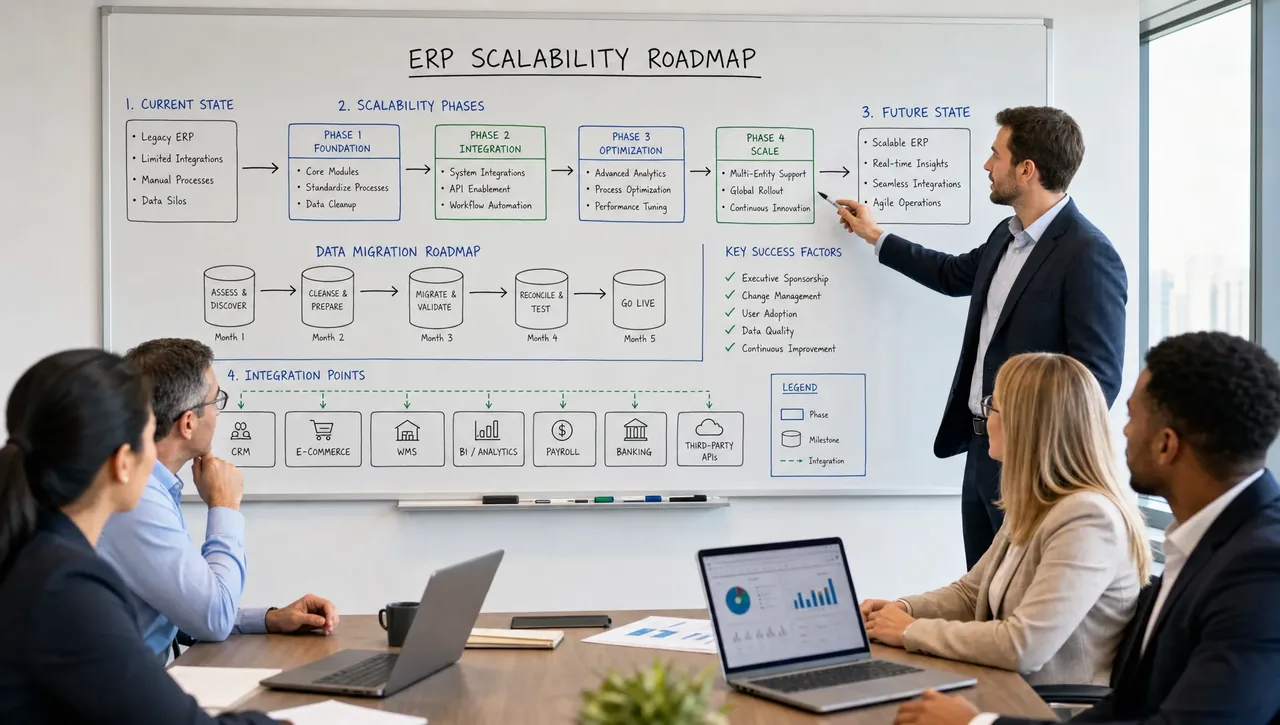
Enterprise resource software rarely operates alone. It usually sits at the center of a wider technology stack that may include CRM, ecommerce, POS, payroll, banking, shipping, business intelligence, document management, industry-specific tools, and customer portals.
Scalable ERP requires clear integration planning. Ask vendors and implementation partners how integrations are built, monitored, maintained, and upgraded. A quick one-way data sync may work at low volume, but it can become fragile as transactions increase or business rules become more complex.
You should also define data ownership. For example, customer records may originate in CRM, product data may be managed in ERP, and order data may be created through ecommerce. Without clear master data rules, duplicate records and reporting conflicts will multiply as the business grows.
A strong integration review should answer these questions:
- Which systems must connect on day one?
- Which integrations can wait until phase two?
- Will data move in real time, on a schedule, or by manual import?
- Who owns each key data field?
- How are integration errors logged and resolved?
- What happens to integrations during ERP upgrades?
If the answers are vague, scalability risk is high.
Treat data migration as a scalability test
Data migration is one of the clearest indicators of ERP readiness. If a vendor cannot explain how your data will be cleaned, mapped, validated, tested, and approved, the implementation is already exposed to risk.
Migrating to a scalable ERP is not just moving old records into a new database. It is an opportunity to improve the quality of customers, vendors, products, bills of materials, charts of accounts, inventory balances, open invoices, purchase orders, and historical records.
Poor data quality creates problems that get worse after go-live. Users lose confidence, reports become disputed, and teams return to spreadsheets. Strong migration planning reduces that risk by defining what data will move, what will be archived, what must be cleaned, and how accuracy will be verified.
For Odoo projects, OdooVizion supports migration and upgrades with a zero-data-loss approach, along with implementation, customization, integration, training, and ongoing support for businesses in the USA and UAE.
Calculate total cost of ownership, not only software cost
Scalable ERP selection should include total cost of ownership. Subscription or license fees are only one part of the investment. A cheaper system can become expensive if it requires heavy customization, manual workarounds, weak integrations, or frequent reimplementation.
| Cost category | What to evaluate | Scalability impact |
|---|---|---|
| Software fees | Users, apps, modules, hosting, storage, support plans | Costs should remain predictable as the team grows |
| Implementation | Discovery, configuration, testing, go-live planning | Strong setup reduces rework later |
| Data migration | Extraction, cleansing, mapping, validation, historical data | Better data improves reporting and adoption |
| Integrations | APIs, connectors, middleware, monitoring | Prevents disconnected systems as volume increases |
| Customization | Custom modules, workflows, reports, approvals | Must be governed to avoid upgrade issues |
| Training | Role-based training, documentation, super user preparation | Improves adoption and reduces support load |
| Ongoing support | Bug fixes, enhancements, upgrades, user assistance | Keeps the ERP aligned with business change |
The best financial evaluation looks beyond year one. Ask what the system will cost to operate, adapt, and support over three to five years.
Measure usability and adoption risk early
A scalable ERP that users avoid will not scale in practice. Adoption depends on how well the system fits daily work, how clearly roles are defined, and how effectively teams are trained.
During demos, do not accept generic presentations only. Ask vendors to show your real workflows using sample scenarios from your business. A finance user should see month-end reporting. A warehouse user should see receiving, picking, transfers, and adjustments. A sales manager should see pipeline, quotations, order status, and customer history if those processes are in scope.
User acceptance testing should happen before go-live, not after. It gives employees a controlled way to validate workflows, identify missing steps, and build confidence. It also helps leadership distinguish between true system gaps and training needs.
Skipping change management is one of the most common causes of ERP disappointment. OdooVizion covers related pitfalls in its guide to ERP mistakes small businesses make, including weak requirements gathering, underestimated migration, and over-customization.
Use a scoring matrix to compare ERP options
ERP decisions can become emotional, especially when different departments prefer different tools. A scoring matrix gives leadership a structured way to compare options against business priorities.
The exact weights should reflect your company, but the example below is a practical starting point.
| Evaluation area | Suggested weight | What good looks like |
|---|---|---|
| Process fit | 20% | Supports core workflows with minimal workarounds |
| Scalability | 15% | Can handle more users, transactions, entities, and modules |
| Integration readiness | 15% | Connects reliably with critical business systems |
| Data migration approach | 15% | Includes cleansing, testing, validation, and rollback planning |
| User experience | 10% | Clear screens, role-based workflows, strong adoption potential |
| Reporting | 10% | Gives leaders accurate, timely operational and financial visibility |
| Security and controls | 10% | Supports permissions, auditability, backups, and compliance needs |
| Partner capability | 5% | Provides proven implementation, training, and support expertise |
A scoring model will not make the decision for you, but it will expose tradeoffs. For example, a platform might score high on advanced functionality but low on ease of implementation. Another might be more flexible for SMB growth but require a strong partner for customization and integration.
Review security, compliance, and governance
As companies grow, ERP becomes a critical control system. It contains financial data, customer records, vendor information, employee details, pricing, inventory, and operational history. Security cannot be handled after implementation.
At minimum, evaluate user permissions, approval controls, password policies, backup strategy, audit logs, hosting practices, and data access by role. For companies operating across borders, data residency and local regulatory requirements may also matter.
The NIST Cybersecurity Framework is a useful reference for thinking about cyber risk in a structured way. You do not need to turn ERP selection into a full security audit, but you should ask practical questions about how the platform and implementation partner help protect confidentiality, integrity, and availability.
Governance also applies to customization. Scalable ERP requires a clear process for approving changes, documenting workflows, testing updates, and managing upgrades. Without governance, the system can become cluttered with one-off requests that slow future improvements.
Choose the implementation partner as carefully as the software
The platform matters, but the implementation partner often determines whether ERP delivers business value. A strong partner translates business requirements into practical workflows, prevents unnecessary customization, plans migration carefully, trains users, and supports the organization after go-live.
Look for a partner that can discuss both business process and technical execution. They should understand your industry, your growth goals, your reporting needs, and your integration environment. They should also be willing to challenge assumptions when a requested customization could create long-term complexity.
For companies considering Odoo, partner selection is especially important because Odoo can be adapted to many industries and workflows. That flexibility is powerful when implemented well. It can also become messy without scope control, technical standards, and a phased roadmap.
OdooVizion is an Odoo Certified Partner serving businesses in the USA and UAE, with services covering ERP implementation, migration, customization, integration, workflow automation, training, consultation, 24/7 technical support, and on-site go-live support.
When Odoo should be on your shortlist
Odoo is often considered by small and mid-sized businesses that want a modular ERP with room to grow. Its ecosystem can support many business functions, and its flexibility makes it attractive for companies that need more than basic accounting or disconnected point solutions.
However, choosing Odoo still requires careful edition, hosting, customization, and support decisions. The best setup depends on whether you need deep customization, specific apps, certain hosting controls, or a particular support model. If Odoo is on your shortlist, review the differences between Odoo Community, Enterprise, and Online before committing to an implementation path.
Odoo is not the right answer for every company, and no ERP is. The key is matching platform capability, implementation approach, and long-term operating model to your growth strategy.
A practical 30-day ERP evaluation plan
You do not need a year-long selection project to make progress. A focused 30-day evaluation can clarify priorities and reduce risk.
- Days 1 to 5, define outcomes: Identify the business results you expect from ERP, such as faster closing, better inventory accuracy, fewer manual tasks, improved customer visibility, or multi-location control.
- Days 6 to 10, map critical workflows: Document current pain points and future requirements for finance, sales, operations, inventory, service, manufacturing, HR, or other key functions.
- Days 11 to 15, shortlist vendors: Compare platforms based on process fit, scalability, deployment model, integration needs, and total cost of ownership.
- Days 16 to 22, run scenario-based demos: Ask vendors or partners to demonstrate real workflows using your business examples, not generic scripts.
- Days 23 to 27, validate migration and support: Review data migration scope, testing methods, training plans, go-live support, and post-launch service.
- Days 28 to 30, score and decide next steps: Use a weighted matrix, document assumptions, identify risks, and confirm whether you are ready for discovery or a pilot phase.
This approach helps teams move from general ERP research to an informed decision without rushing into implementation.
Red flags that your ERP choice may not scale
Some warning signs appear before the contract is signed. Pay attention to them.
- The demo looks impressive but does not reflect your workflows.
- The vendor cannot explain how data migration will be validated.
- Integrations are described in broad terms with no technical plan.
- Customization is proposed before requirements are fully understood.
- Training is treated as a brief final step instead of an adoption strategy.
- Reporting depends heavily on manual exports to spreadsheets.
- The support model after go-live is unclear.
- The pricing conversation avoids implementation, migration, integration, and future change costs.
If several of these appear, pause the selection process. It is better to fix uncertainty before implementation than to pay for it after go-live.
Frequently Asked Questions
What is enterprise resource software?
Enterprise resource software, commonly called ERP, is a system that connects core business functions such as finance, sales, inventory, purchasing, operations, HR, and reporting in one integrated platform.
How do I know if ERP software will scale with my business?
Look at more than user capacity. Evaluate whether the ERP can support more transactions, entities, locations, integrations, workflows, reporting needs, and security controls without excessive customization or manual workarounds.
Should a growing SMB choose a simple ERP or a more advanced system?
The best choice is usually a system that can start simple and expand. Overly basic tools may create limitations, while overly complex systems can slow adoption. A phased, modular ERP approach is often the most practical path.
Why is implementation partner selection so important?
A qualified partner helps translate business requirements into reliable ERP workflows. They also manage migration, configuration, customization, training, integrations, testing, and support, which directly affects long-term scalability.
Is Odoo a scalable ERP option?
Odoo can be a scalable option for many small and mid-sized businesses, especially when the right edition, hosting model, modules, integrations, and implementation plan are selected. The fit depends on your processes, industry, and growth roadmap.
Ready to choose enterprise resource software that can grow with you?
Selecting ERP is not only a software decision. It is a growth decision. The right enterprise resource software should simplify operations today while giving your business a clear path for expansion tomorrow.
If you are planning an Odoo implementation, migration, customization, or integration in the USA or UAE, OdooVizion can help you evaluate your requirements, plan a safer rollout, and support your team from discovery through go-live and beyond.
Odoo Certified Partner Honest fit, scope, and cost read Reply within 1 business day
Choosing an ERP that can scale with you?
Tell us your growth plans and current stack — we’ll give you a free, honest read on fit, scope, and total cost. No obligation.