

Business Process Automation Software Features That Save Hours
Every growing company has a few workflows that quietly steal the week. A manager waits for an approval email, accounting retypes invoice data, sales copies details from a quote into an order, and operations updates inventory after the fact. None of these tasks look dramatic on their own, but together they create delays, errors, and hours of avoidable work.
That is where business process automation software becomes valuable. The goal is not to replace judgment or remove people from the business. The goal is to let software handle repeatable steps, route work to the right person, and keep data moving without constant manual follow-up.
This is not just a technology trend. McKinsey Global Institute has reported that about 60 percent of occupations have at least 30 percent of activities that could be automated using current technologies. For small and mid-sized businesses, the opportunity is especially practical: automate the work that slows teams down every day.
If you are still trying to quantify the hidden cost of manual work, OdooVizion's guide on manual work vs ERP cost explains why repeated small inefficiencies often become a larger expense than business leaders expect.
What makes an automation feature worth your time?
Not every digital tool is true automation. A shared spreadsheet is digital, but it still depends on people updating cells, checking versions, and reminding each other what to do next. A form is digital, but if someone must manually copy the form data into accounting, inventory, or CRM, the process is still mostly manual.
A time-saving automation feature should do at least one of these three things:
- Remove duplicate data entry between systems or departments.
- Trigger the next step automatically when a condition is met.
- Alert the right person only when action or review is needed.
The best business process automation software features do all three. They reduce clicks, prevent missed handoffs, and create a cleaner audit trail. That is especially important for companies operating across locations, time zones, or markets, such as businesses with teams in the USA and UAE.
The hour-saving features to prioritize
The most valuable automation features are usually found in everyday workflows, not isolated one-time projects. Look for processes that happen daily or weekly, involve multiple people, and create delays when someone forgets a step.
| Automation feature | Hours saved from | Common use cases |
|---|---|---|
| Workflow triggers and approvals | Chasing emails, manual sign-offs, unclear ownership | Purchase approvals, expense approvals, discount approvals |
| Smart forms and document capture | Retyping data from invoices, forms, and requests | Vendor bills, expense receipts, customer onboarding |
| Shared ERP database | Updating the same information in multiple places | Sales orders, inventory updates, accounting entries |
| Integrations and APIs | Moving data between disconnected tools | Ecommerce, shipping, payment gateways, payroll |
| Automated reporting | Manually building weekly or monthly reports | Sales performance, cash flow, inventory levels |
| Accounting automation | Repetitive invoice, payment, and reconciliation tasks | Recurring invoices, bank feeds, payment reminders |
| Inventory and procurement rules | Stock checks, manual reorder planning, backorder follow-up | Reordering, warehouse transfers, demand planning |
| CRM and support automation | Missed follow-ups and inconsistent customer communication | Lead assignment, ticket routing, follow-up reminders |
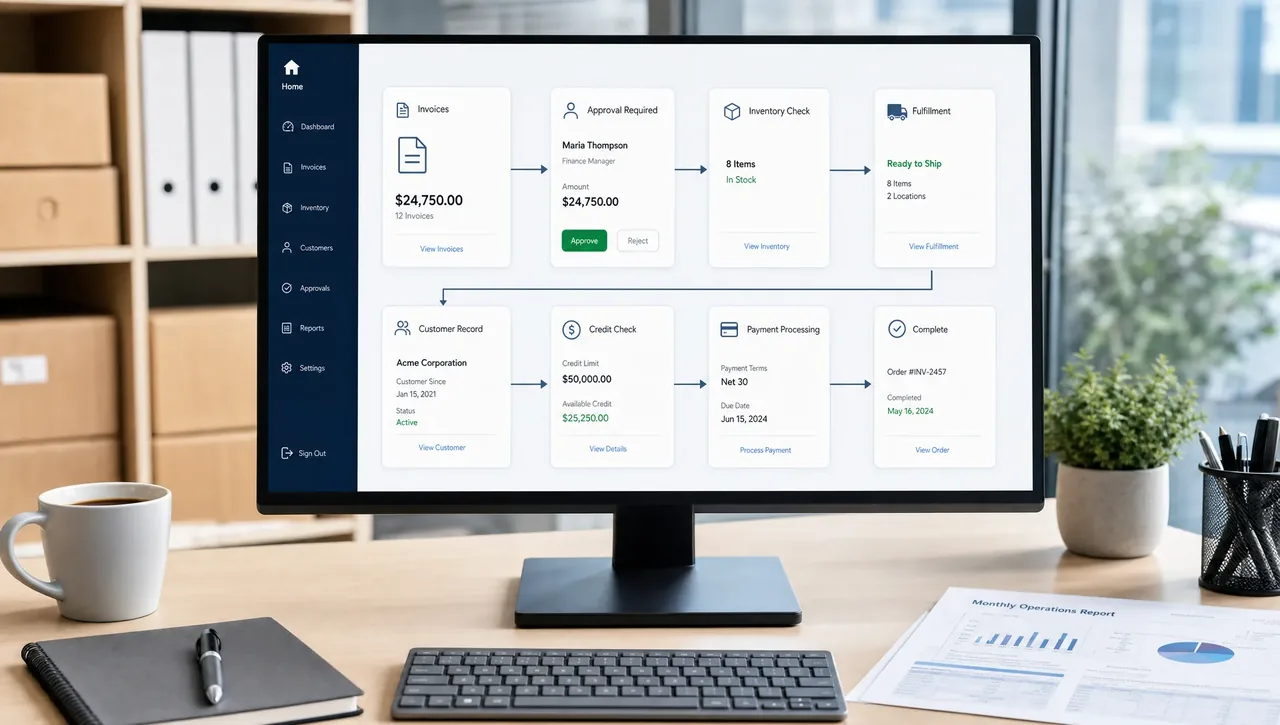
1. Workflow triggers and approval routing
Approval workflows are one of the fastest places to recover lost hours. In a manual process, an employee sends a request, a manager reviews it when they have time, someone asks for more information, and the requester follows up again. If the approver is traveling or the email is buried, the process stalls.
Automation changes the flow. A purchase request can be routed automatically based on department, amount, vendor, or project. A discount request can go to a sales manager only when it exceeds a defined threshold. An expense claim can move to finance after the manager approves it.
The most useful features include role-based approvals, automatic notifications, escalation rules, and an audit trail. The audit trail matters because it shows who approved what, when, and under which conditions. That saves time during internal reviews and helps reduce confusion when questions come up later.
2. Smart forms, OCR, and document automation
Many teams lose hours because important business data arrives in unstructured formats: invoices, receipts, PDFs, emails, scanned documents, and handwritten notes. Someone has to read the document, extract the details, enter them into the system, and check for mistakes.
Modern business process automation software often includes smart forms, optical character recognition, and document workflows that reduce this manual effort. For example, invoice data can be captured from a vendor bill, matched with purchase information, and sent for approval. Employee forms can feed directly into HR records. Customer onboarding details can populate CRM and billing records without being typed twice.
This does not mean every document should bypass human review. The best approach is exception-based: the system handles standard cases and flags unclear, missing, or unusual data for a person to verify. That saves time while keeping control in place.
For businesses evaluating Odoo specifically, our article on how Odoo AI is automating business processes in 2026 explores how AI-assisted workflows are changing finance, documents, sales, HR, and operations.
3. A shared ERP database instead of duplicate entry
One of the biggest time drains in a growing business is entering the same data into multiple systems. Sales updates CRM, operations updates inventory, accounting creates an invoice, and management asks for a report that requires combining all of it.
A strong ERP-based automation setup reduces that duplication. When a quote becomes a sales order, the information should flow into delivery, invoicing, and reporting. When inventory is received, the update should be visible to purchasing, sales, and finance. When a customer record changes, the change should not have to be copied manually across different tools.
This is why business process automation software is often most powerful when it is connected to an ERP system. If you need a simple foundation, OdooVizion's overview of what ERP software is and how it works explains how finance, inventory, HR, sales, and service can work from one system instead of disconnected files.
4. Integrations that remove handoffs between tools
Most companies do not run on one application alone. They use ecommerce platforms, payment processors, shipping tools, marketing apps, point-of-sale systems, payroll systems, and industry-specific software. Without integrations, employees become the bridge between those systems.
That bridge is expensive. People export CSV files, reformat data, upload reports, reconcile mismatches, and fix errors. Good automation software connects systems so that data moves based on rules instead of manual uploads.
The key is not simply having an API. The real time saver is a reliable integration with clear data mapping, error logs, retry rules, and ownership. If an order fails to sync, the team should know why and what action is needed. Otherwise, automation creates a new problem: invisible errors.
5. Automated reporting and exception alerts
Manual reporting can consume hours every week. Teams pull numbers from different systems, check formulas, update slides, and send the same report again next week. By the time the report is ready, the data may already be outdated.
Automated reporting saves time in two ways. First, dashboards give managers access to current information without asking someone to build a report. Second, scheduled reports deliver recurring updates without manual preparation.
The most important feature, however, is exception alerting. Leaders should not have to inspect every metric every day. The system should flag the issues that need attention, such as low stock, overdue invoices, late deliveries, unusual discounts, or stalled opportunities. This shifts teams from searching for problems to solving them.
6. Accounting automation that reduces repetitive finance work
Finance teams often deal with high-volume, rules-based work. That makes accounting one of the strongest areas for automation. Depending on the software setup and local requirements, automation can support recurring invoices, vendor bill processing, payment reminders, bank feed matching, tax rule application, and approval routing.
The time savings come from reducing repetitive work and improving accuracy. For example, recurring customer invoices do not need to be recreated each billing cycle. Vendor bills can be routed to the right approver. Payment reminders can go out on schedule. Bank transactions can be matched more efficiently against invoices and payments.
Still, finance automation should be implemented carefully. Approval limits, tax settings, chart of accounts, and reporting requirements must be configured correctly. A poorly designed finance workflow can create more cleanup work than it saves.
7. Inventory and procurement automation
Inventory teams lose time when they rely on manual counts, delayed updates, or disconnected purchasing processes. The result is familiar: stockouts, overstocking, emergency purchases, and customer service issues.
Automation helps by connecting stock levels, purchase orders, sales demand, warehouse transfers, and vendor lead times. Reorder rules can suggest or trigger purchasing actions when stock reaches defined thresholds. Barcode workflows can reduce manual entry in receiving and shipping. Procurement approvals can route automatically based on amount, department, or product category.
For companies with multiple warehouses, retail locations, or service teams, this can save hours every week while improving customer reliability. The biggest benefit is not just faster purchasing. It is fewer surprises.
8. CRM, sales, and customer service automation
Sales and support teams often lose time on follow-ups rather than customer conversations. Leads sit unassigned, quotes wait for approval, customers repeat the same details, and support tickets bounce between people.
Automation can assign leads by territory, source, product interest, or workload. It can create next-step reminders, generate quote templates, route discount approvals, and notify teams when an opportunity has stalled. In customer service, ticket routing and service-level alerts help ensure requests reach the right person quickly.
The best sales automation does not make customer communication feel robotic. It gives teams structure so they can respond faster and more consistently. Human judgment still matters for negotiation, relationship building, and complex customer needs.
9. HR self-service and employee workflow automation
HR and operations teams handle many requests that follow predictable rules. Leave requests, onboarding steps, timesheets, policy acknowledgments, equipment requests, and employee information updates can all create unnecessary admin work when handled manually.
Self-service portals and automated approvals reduce back-and-forth communication. Employees can submit requests in a structured format, managers can approve them from a clear queue, and HR can track status without searching through email threads.
This is especially helpful for growing SMBs because HR teams are often lean. Automating routine requests gives HR more time for hiring, retention, training, and employee experience.
10. Custom workflows for industry-specific processes
The most valuable automation is sometimes not available out of the box. A distributor may need special approval rules for bulk orders. A service company may need field operations tied to invoicing. A manufacturer may need a custom quality check before delivery. A company operating across regions may need workflows that reflect local compliance, currencies, or approval structures.
This is where customization matters. Business process automation software should be flexible enough to match how the company actually operates, without forcing every process into a generic template. For a broader look at removing workflow delays, see our guide to business process management software that eliminates bottlenecks.
Custom module development, system integration, and workflow automation are especially important when a business has outgrown spreadsheets but still has unique operational requirements. The goal is not to customize everything. The goal is to customize the few workflows that create measurable time savings or competitive advantage.
How to choose the features that will save the most hours
Before buying or configuring automation software, map your current processes. Choose one high-volume workflow and document every step from request to completion. Include who touches it, what data is entered, where delays happen, and what errors occur most often.
Use this simple evaluation framework:
| Question | Why it matters |
|---|---|
| Does the process happen daily or weekly? | Frequent tasks create faster time savings. |
| Does it require duplicate data entry? | Duplicate entry increases errors and labor cost. |
| Does it involve approvals or handoffs? | Routing automation reduces delays. |
| Are the rules clear? | Clear rules are easier to automate safely. |
| Are exceptions common? | The system should flag exceptions rather than hide them. |
| Does the workflow affect customers or cash flow? | These processes often produce the highest business impact. |
A common mistake is automating a broken process exactly as it exists today. Before implementation, remove unnecessary steps, clarify decision rules, and define ownership. Automation works best when the process is already understood.
Implementation details that make or break ROI
Features alone do not save hours. Implementation quality does. A well-configured workflow can make a team faster within weeks, while a poorly planned rollout can create confusion and resistance.
Pay close attention to data quality, user roles, approval rules, training, integrations, and testing. If old customer records, product data, vendor information, or accounting structures are messy, automation will only move messy data faster. Clean data is the foundation of reliable automation.
Training is equally important. Employees need to understand not only which buttons to click, but why the workflow changed. When users see how automation removes repetitive work, adoption becomes easier.
For SMBs implementing Odoo, this is where working with an Odoo-certified partner can reduce risk. A partner can help map workflows, migrate data, configure modules, build custom features, integrate external systems, train teams, and support go-live during implementation.
Frequently Asked Questions
What is business process automation software?
Business process automation software helps companies automate repetitive workflows such as approvals, data entry, reporting, invoicing, inventory updates, and customer follow-ups. It uses rules, triggers, integrations, and shared data to reduce manual work.
Which automation features save the most hours?
The biggest time savers are usually workflow approvals, automated data capture, ERP integrations, recurring reports, accounting automation, inventory reorder rules, and CRM follow-up automation. The best choice depends on where your team loses the most time today.
Is business process automation only for large companies?
No. Small and mid-sized businesses often benefit quickly because they have lean teams and many manual handoffs. Automation can help them scale without adding unnecessary admin work.
How do I know which process to automate first?
Start with a process that happens often, involves multiple people, causes delays, and has clear rules. Examples include purchase approvals, invoice processing, quote approvals, inventory replenishment, or employee leave requests.
Can Odoo be used for business process automation?
Yes. Odoo is a modular ERP platform that can support automation across areas such as sales, accounting, inventory, purchasing, HR, CRM, and operations. The value depends on proper configuration, integration, customization, and user training.
Ready to save hours with smarter Odoo automation?
If your team is spending too much time on approvals, duplicate data entry, disconnected systems, or manual reporting, the right automation strategy can make a measurable difference.
OdooVizion is an Odoo Certified Partner serving businesses in the USA and UAE. Our team supports Odoo implementation, migration, customization, integration, workflow automation, training, consultation, 24/7 technical support, zero-data-loss migration, and on-site go-live support.
Talk to OdooVizion to identify the workflows costing your team the most time and build an Odoo automation plan that supports growth without adding unnecessary complexity.
Odoo Certified Partner Honest fit, scope, and cost read Reply within 1 business day
Which workflow is quietly stealing your week?
Tell us where your team loses time to approvals, retyping, or manual reports — we’ll show what Odoo can automate first. No obligation.